
Invoicing and client management for freelancers
When a client requests more work, agree on the addition before changing the scope.
Start with one client and a clear agreement
Record the client and prepare an estimate for the services you intend to provide. Once the agreed requirement and signatures are complete, prepare the linked invoice and deliberately generate the approved service work. A saved estimate or a collected payment does not create delivery tasks by itself.
This is a workspace for independent client services, not a general ledger, payroll system or source of automatic tax advice.
Price the extra work before it joins the project
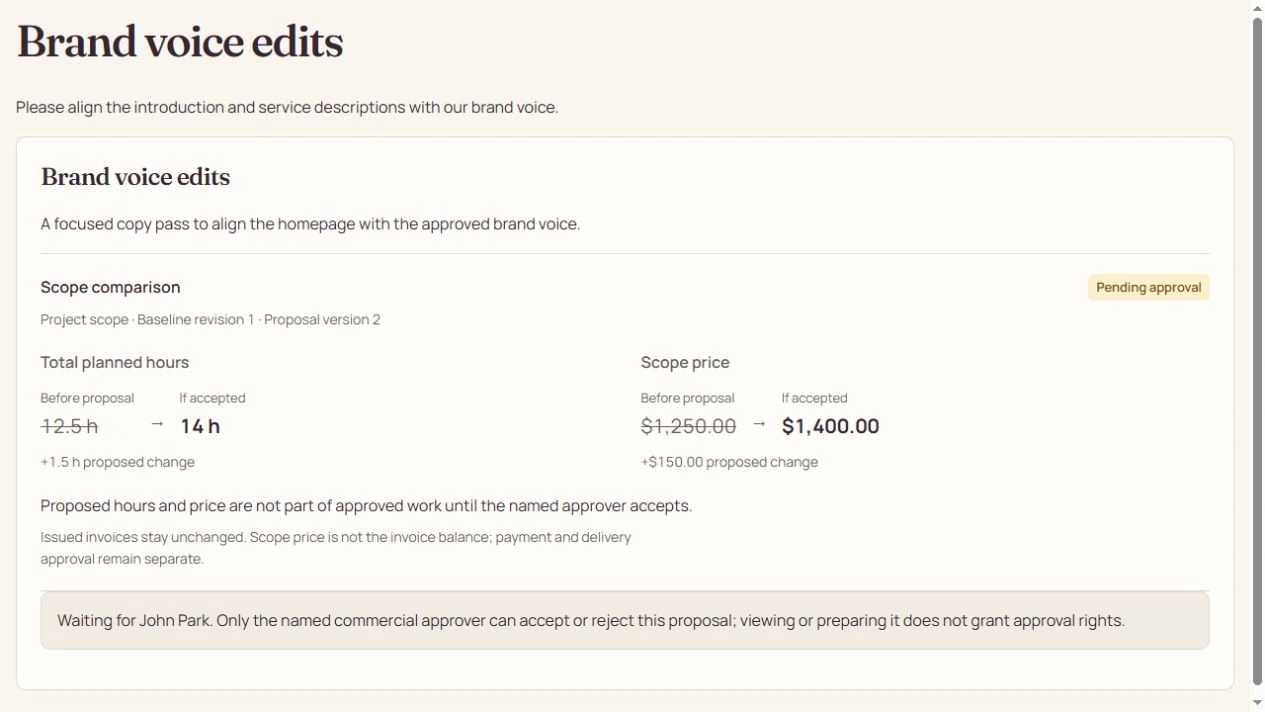
A request for another page or a new round of brand work is an outcome to review, not an approved addition. Publish the scope, planned effort and price against the current agreement, then send it to the named commercial approver.
An approved positive change against an issued invoice creates a separate supplementary draft for financial review. It does not rewrite the original invoice or complete the new work.
One client. Clear agreements and approved changes.
- Agreed scope
- An estimate outlines the planned services. Work is generated deliberately once approved.
- Proposed additions
- Brand or scope requests stay as proposals until the named approver accepts.
- Clean collection
- Solo uses managed Stripe onboarding. The 1% fee applies to successfully collected invoice principal.
Keep the client’s decisions separate from collection
Share the published deliverable for its own version-specific review. The person who may approve the work can be different from the person who may pay. Private tasks, costs and notes stay out of the published client view.
Solo uses managed Stripe recipient onboarding and a Moolamochi percentage fee on successful collection, plus actual processing fees. Compare the current plans and check payment eligibility before choosing a route.
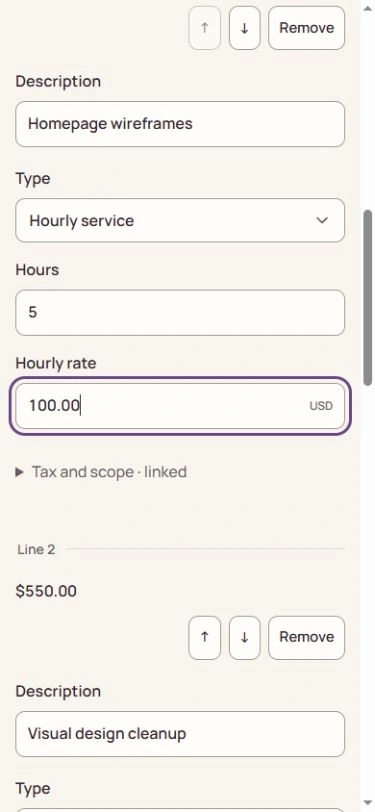
Open the full-size image to inspect the controls. Your available actions depend on the record’s state and your explicit permissions.
See the steps before you act.
Watch a silent recording of the actual interface, with captions and written steps.
Open the complete Help Center guideWatch the walkthrough and read the steps
Approve added scope without rewriting an invoice
Who acts: Client requester → assigned provider → named commercial approver → Finance
Turn an outcome request into a versioned proposal, then keep its new work and supplementary draft separate from the issued original.
Go straight to the steps
Playback and accessibility
Use Play or Pause, move back or forward 10 seconds, or restart from the title screen. Tab to a button, then press Enter or Space. Action captions are included in the video, and the complete written steps follow below.
Download the action captionsGo straight to the written stepsPrepare the client’s outcome request
The recording types Brand voice edits and its context in the native client request form, stopping before Submit request. In your assigned project, select the requested outcome and submit it for provider assessment. A request is not a price or commercial consent.
Review the provider’s planned effort
The recording edits planned duration and settles on 1.5 hours. The provider must also select the linked invoice and named commercial approver, review scope and the $100 hourly rate, then save and publish the complete +$150 proposal against the current baseline. No proposal is saved or published in the recording.
Review the exact commercial consent
The designated client compares Scope comparison, Baseline revision and Proposal version, then checks the exact-version acceptance confirmation to enable Accept scope and price. The recording stops before submission. Reject proposal has its own confirmation and leaves approved work and money unchanged. If the version changes, reload and compare again. Internal owners cannot decide for the client.
Inspect the illustrative post-approval work
The post-approval demonstration shows Brand voice edits in Backlog, 14 approved hours and 8.5 hours complete: 61%. An accepted current proposal creates its work once; approval does not complete it.
Preserve the original and review the supplement
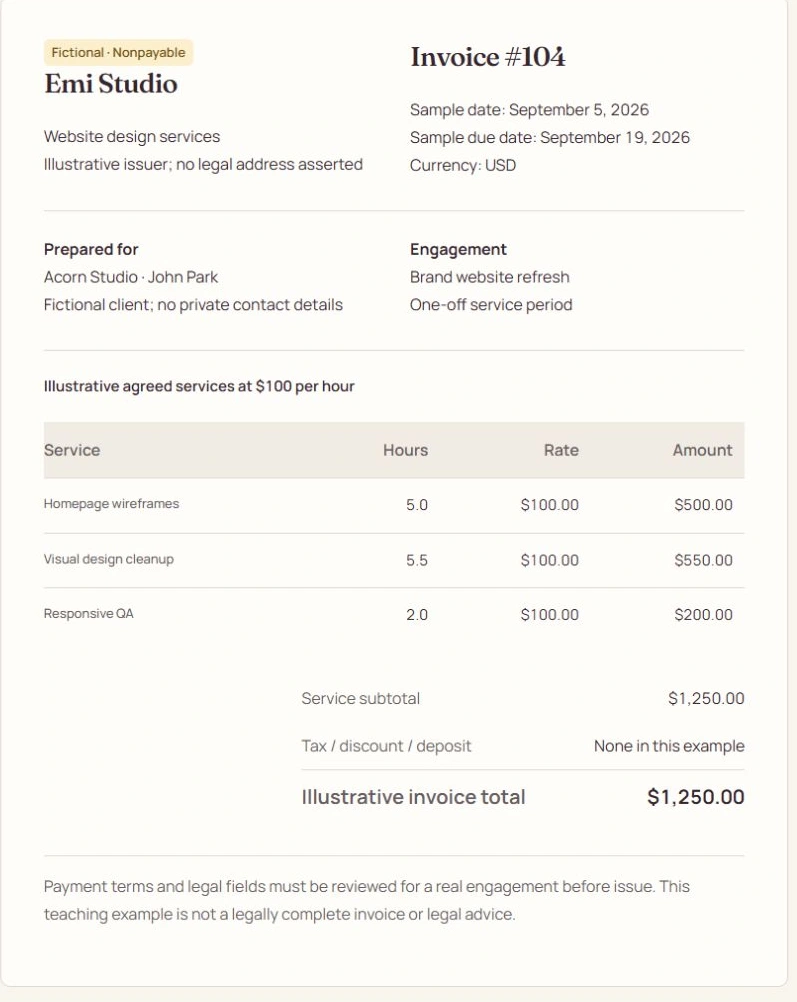
The recording reviews the issued original’s permitted actions without a money-edit action. Invoice #104 remains $1,250; Auto-adjust hours is a disabled Saved setting, not an editable issued-hour control. After real approval, Finance separately reviews and issues the linked $150 supplementary draft. Until issue, it is not an outstanding receivable. Negative scope uses a credit draft for Finance review.
What changes when you finish
One approved scope revision, one new work item and one $150 supplementary draft. The issued $1,250 original is unchanged.