
CRM and permission-based follow-up for client work
Manage contacts and opportunities, then send reviewed sequences from an authorized mailbox without losing replies, opt-outs or permission history.
Start with a contact you may approach
Record the source and your permission assessment before enrollment. A public address or a purchased list does not establish permission. CSV imports require field mapping and an explicit create, merge or skip decision, while keeping suppression history.
Connect a mailbox deliberately
Outreach uses your connected Gmail or Microsoft 365 account, separately from transactional invoice email. A private mailbox requires its owner’s share grant even for workspace administrators. Missing OAuth setup, expired consent and sync failures appear as disconnected or paused states.
A sending limit is not permission to send.
- Before enrollment
- Record the contact source and your permission assessment. Imported suppression history stays attached.
- When a reply arrives
- Any reply, including out-of-office, stops the relevant enrollment for human review.
- When a send is uncertain
- A provider timeout is not an invitation to resend. Reconcile the outcome and restore authorized access first.
Use a bounded sequence, then listen
Sequences contain one to six reviewed steps. Defaults are weekdays 09:00–17:00, at least one business day between steps, 50 sends per mailbox per day, 60 seconds apart and 1,000 per calendar month. Lower provider limits take precedence. These ceilings do not establish legal permission or guarantee delivery.
Any reply, including an out-of-office response, stops the enrollment for human review. Relevant bookings, accepted estimates, won or lost opportunities and first linked payments also stop follow-up. Refunds never restart it. Opt-outs and complaints apply workspace-wide; a hard bounce holds every email class until the address is corrected and verified.
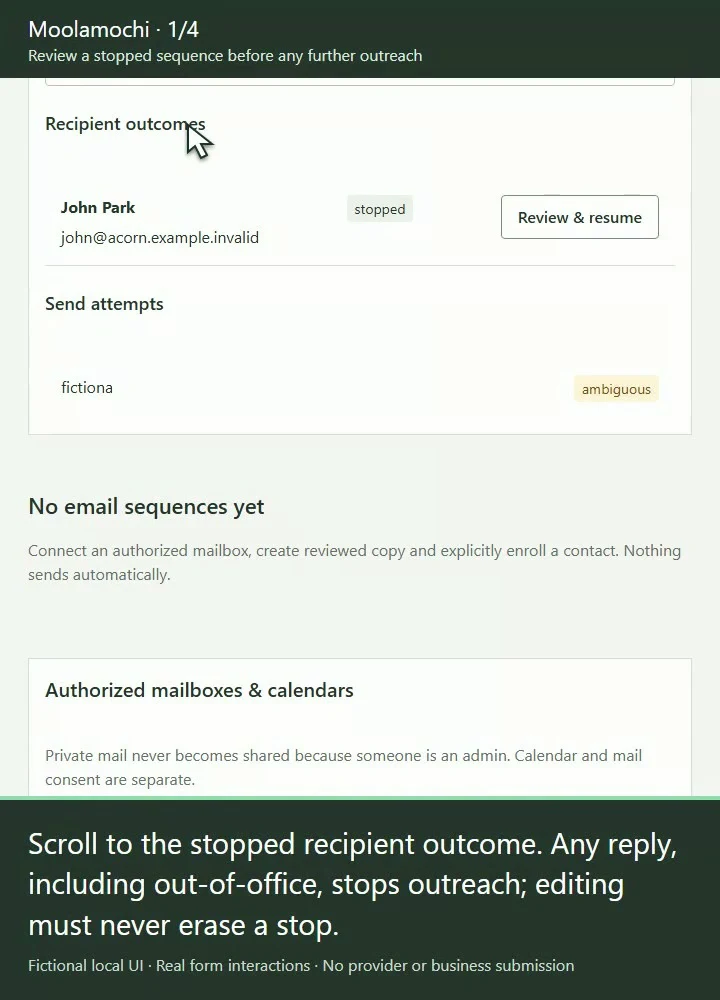
Open the full-size image to inspect the controls. Your available actions depend on the record’s state and your explicit permissions.
See the steps before you act.
Watch a silent recording of the actual interface, with captions and written steps.
Open the complete Help Center guideWatch the walkthrough and read the steps
Review a stopped sequence before any further outreach
Who acts: Authorized mailbox owner or explicitly shared sender
Read enrollment stops and workspace suppression before considering another send. A reply, including out-of-office, requires human review.
Go straight to the steps
Playback and accessibility
Use Play or Pause, move back or forward 10 seconds, or restart from the title screen. Tab to a button, then press Enter or Space. Action captions are included in the video, and the complete written steps follow below.
Download the action captionsGo straight to the written stepsInspect the stopped recipient outcome
The recording scrolls to Recipient outcomes on the paused sequence. Its stopped enrollment is not reactivated. Any reply, including out-of-office, stops the relevant outreach. Review the linked contact and opportunity before considering a next action.
Inspect explicit private-mailbox access
The recording expands Explicit mailbox sharing and shows the user-specific access controls without changing a grant. Private mail is not available merely because someone is an admin. Read the actual reply only with owner or explicit sharing access. Relevant booking, accepted estimate, won/lost deal and first linked payment also stop outreach; refunds never resume it.
Prepare an all-mail address hold
The recording opens a suppression draft, enters an address and checks Hold address for all mail, without saving. Workspace suppression follows imports, merges and mailboxes. Hard bounce holds all classes until corrected and verified; marketing opt-out does not override address safety.
Keep an uncertain send unresolved
The recording changes the observed-outcome selector and restores Unresolved without submitting. Inspect the provider’s sent folder and message ID before recording reconciliation evidence. OAuth expiry or disconnection needs an official reconnect. Never blindly resend after a provider timeout.
What changes when you finish
Stopped and suppressed recipients do not receive the next sales step. Human review and current eligibility, not a refund or blind retry, govern future outreach.